Web Design vs Web Development: What Entrepreneurs Need to Know


Getting a website up and running can feel overwhelming for a non-technical entrepreneur. You know you need an online presence, but where to start? You’ve likely heard terms like web design and web development thrown around interchangeably, and maybe even searched for a “website designer near me” or “web developers near me” without knowing exactly who or what you need. This guide will demystify the process by explaining the difference between web design and web development, walking you through the website design and development process, and exploring your options – from DIY website creators to professional agencies. We’ll use simple analogies (think building a house) to keep things clear, and we’ll be honest about the pros and cons of each route. By the end, you’ll understand what it takes to create a successful website and why many entrepreneurs underestimate the effort and strategy involved in good website design and development.
Understanding Web Design vs. Web Development
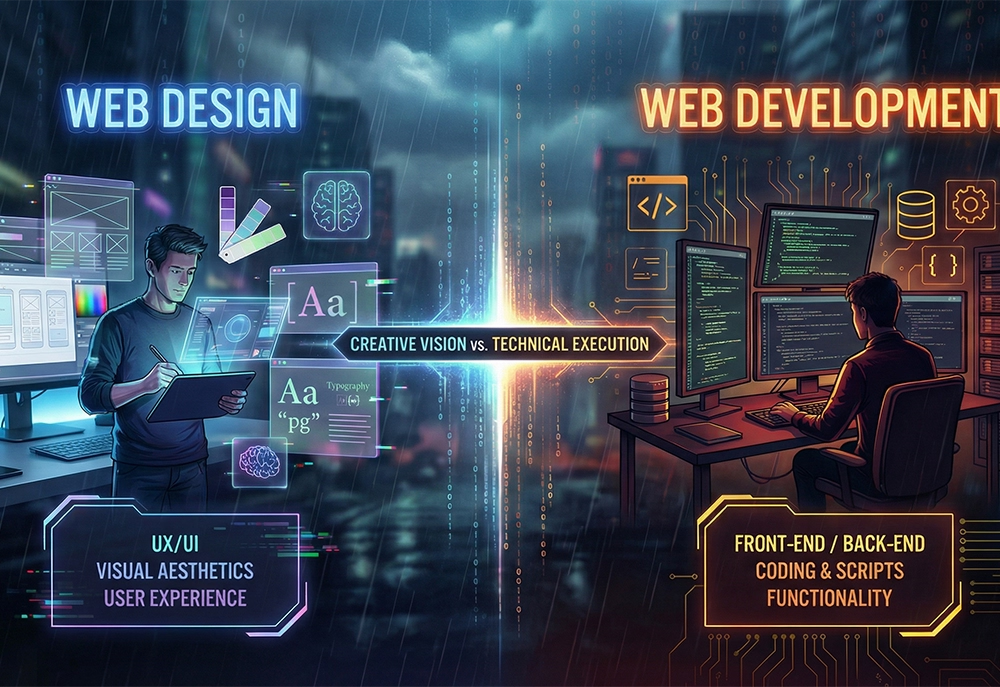
Web design and web development are two halves of the website creation coin. In simple terms, web design is about the look and feel of the site, while web development is about how it works under the hood. Let’s break that down with an easy analogy:
- Web Design = The Blueprint & Interior Design: Imagine building a house. Web designers are like architects and interior decorators combined. They draft the blueprint for your website’s layout and decide how each page will look. This includes choosing colors, typography, images, and arranging content – much like picking the wall colors and furniture in a home. The goal of website design is to make the site visually appealing and user-friendly. A good designer focuses on user experience (UX), ensuring that when visitors land on your site, everything is arranged logically and looks inviting. Just as a well-designed house guides guests to the living room or kitchen, a well-designed web page guides users to important information or calls-to-action (like a “Buy Now” button).
- Web Development = The Construction & Engineering: Continuing the house analogy, web developers are like the construction crew and engineers. They take the designer’s blueprint and build the website using code. If design decides how the website looks, development decides how the website functions. Developers handle the technical side – writing HTML, CSS, JavaScript and using frameworks or content management systems – to turn design mockups into a live, interactive site. They ensure features work correctly, links go to the right places, forms submit data, and (if it’s an e-commerce site) that the shopping cart actually processes orders. In other words, developers lay the structural foundation, wiring, and plumbing of the “house” so everything runs smoothly behind the scenes.
Both roles are essential. A beautifully painted house isn’t livable if the electricity and plumbing don’t work, and a solidly built house still needs paint and decor to feel welcoming. In the same way, web design and web development must collaborate to create a successful website. Often, web designers and web developers work hand-in-hand: designers create wireframes and visual mockups, then developers code those into reality. In smaller projects one person might wear both hats, but it’s important to understand the distinction. Web design focuses on aesthetics and user experience (UI/UX) – how each page web design makes a visitor feel and interact. Web development focuses on functionality and technical implementation – how the site runs and responds. As one source puts it, “Design is about how it looks, development is about how it works”.
Key takeaway: If you’re planning a site, you may need skills in both areas. For example, a website design agency often has designers to craft the look and website developers to handle the code. Understanding these roles helps you ask for the right help – whether you’re hiring a professional or evaluating the tasks you’ll handle yourself. In short, web design and development are complementary parts of website design and development services that together bring your website to life.
The Website Design and Development Process
Creating a website isn’t just a one-and-done task – it’s a multi-step process that benefits from planning and strategy. Knowing the website design and development process will help you see why a good site takes more than just picking a template and adding your logo. Here’s an overview of the typical steps involved, from start to finish:
- Planning and Strategy: Every successful website starts with a plan. This is like the foundation of a house. In this phase, you (often alongside a professional or team) clarify the website’s purpose and goals. Who is your target audience? What do you want users to do on your site (fill a contact form, buy a product, read your blog)? You’ll also consider your brand’s identity (logo, colors, tone) and how to stand out from competitors. This stage may involve researching competitor sites and doing some keyword research for SEO – identifying what terms people might search for to find businesses like yours. Many entrepreneurs skip this step, but a bit of planning saves a ton of headache later. Think of it as drawing up the blueprint before swinging the hammer.
- Content and Architecture: Once you have goals, you need content (the text, images, videos, etc.) and a site structure. Plan what pages you need (e.g. Home, About Us, Services, Contact, Blog) and how they’ll link together (this is your site navigation menu and structure). It’s wise to outline or even sketch a sitemap – a visual map of all pages. Simultaneously, start drafting the key content for each page. High-quality, relevant content is crucial; it not only informs your visitors but also influences your search engine rankings. If you’re not a confident writer, you might hire a copywriter or use at least a clear outline so that the design can accommodate the text. Remember, content and design should work together.
- Web Design (Wireframing & Mockups): With the content structure in mind, the design phase begins. Professional designers often start by creating wireframes – basic, black-and-white layouts that map out where content and elements go on each page (header, images, buttons, etc.). Wireframes are like rough sketches of the floor plan; they help everyone agree on the layout before adding the “paint and decor.” After wireframes, designers create mockups or visual designs of pages, applying your branding, colors, and typography for a polished look. During this phase, you choose things like color scheme and font styles that match your brand. Good web design also means thinking about user experience: ensuring the site is easy to navigate and information is laid out logically. Designers aim for a consistent style across all pages so the site feels cohesive and professional. As an entrepreneur, you’ll review these designs and give feedback. It’s much easier to tweak the look at this stage than after everything is coded!
- Web Development (Building the Site): Now it’s time for the developers (or the “website creators”) to turn the design into a functioning website. This involves writing code or using a platform/CMS (Content Management System) to implement the design. There are two aspects here:
- Front-End Development: This is coding the parts of the website that users see and interact with – basically translating the visual design into HTML, CSS, and JavaScript. It ensures the layout is responsive (mobile-friendly) and interactive elements (menus, buttons, animations) work correctly.
- Back-End Development: This handles the server-side logic (if your site has any). For a simple brochure site, back-end might be minimal or handled by a CMS. But for more complex needs – like user logins, databases, e-commerce functionality (product catalogs, shopping cart, payment processing) – a back-end developer sets up the server, database, and application code that powers those features. They make sure, for instance, that when someone fills your contact form, the data is properly sent to your email or stored. On an e-commerce site, back-end code processes orders and payments securely.
- Testing and Revision: Before launching, a website design agency or developer will thoroughly test the site. This includes checking all links, testing forms, ensuring the site displays well on different devices (desktop, tablet, smartphone) and browsers (Chrome, Firefox, Safari, etc.), and verifying page speed and performance. It’s also the time to double-check SEO basics: do all pages have proper titles and meta descriptions? Are images optimized with alt tags? A good team will also incorporate analytics (like Google Analytics) and set up any necessary integrations (email marketing sign-up, CRM connection, etc.). As an entrepreneur, you should also browse through the site as if you’re a user – this is your chance to catch anything that feels confusing or off-brand. Don’t be afraid to ask for tweaks; polishing details at this stage can turn a good site into a great one. Remember, testing is an ongoing process – even after launch, you’ll gather user feedback and may need to make iterative improvements.
- Launch and Ongoing Maintenance: Launch day! This involves moving the site to your live domain (for example, www.yourbusiness.com) on a hosting server and making it publicly accessible. Even on launch day, it’s common to do one more round of checks. But launching isn’t the end – a website is never truly “finished.” You’ll need to maintain it, which means updating software/plugins (if using a CMS like WordPress), keeping security measures up to date, backing up content, and adding new content or features as your business grows. Website design and development is an ongoing cycle. Over time, you might run A/B tests to improve conversion, update the design for fresh branding, or expand functionality. Many entrepreneurs opt for a website design and development agency or maintenance service to handle updates, or you might manage basic changes in-house if you have the skillset. The key is not to let the site stagnate – technology and consumer expectations evolve, and a good website strategy evolves with them.
By understanding these steps, you can better appreciate why a quality website doesn’t just pop out of thin air. There is a strategic flow from planning to design to development and beyond. Skipping steps (for example, jumping straight into a DIY builder without planning content and structure) can lead to a site that’s disorganized or ineffective. Whether you DIY or hire pros, try to follow this process to cover all the bases of website design and development near me or afar – no matter where or how your site is built, these fundamentals apply.
DIY Website Builders: Pros, Cons, and Limitations
In an effort to save money or time, many entrepreneurs consider DIY website builders such as Wix, Squarespace, Weebly, or GoDaddy’s Website Builder. These platforms – often touted among the best website builders – promise that you can create a professional-looking site with little to no coding. They use templates and drag-and-drop editors to simplify design. This route can work for some folks, but it’s important to understand both the advantages and the limitations before you dive in.
Pros of DIY “Website Creators”:
- Low Upfront Cost: Most DIY builders offer free plans or affordable monthly subscriptions (ranging roughly from $15 to $50 per month for many small business plans). This usually includes hosting and sometimes even a domain for the first year. Compared to hiring a web design company which can cost hundreds or thousands upfront, DIY seems cheap.
- Ease of Use (on the Surface): They advertise “no coding required” and indeed, you can select a website design template and start replacing the text and images with your own. For a basic informational site, you might indeed drag-and-drop your way to a finished homepage in a day. The platforms are designed for beginners, with user-friendly interfaces.
- Quick Start: If you just need a simple page up fast – say for an event or a temporary project – you really can launch in hours, not weeks. The appeal is that you don’t have to wait for a developer’s schedule. You have full control to publish whenever you’re ready.
- All-in-One Convenience: DIY platforms bundle a lot of features: design tools, some built-in SEO settings, forms, even e-commerce modules (for example, Squarespace and Wix let you add a simple store). They also handle technical maintenance like software updates, security patches, and server management behind the scenes. For someone with no technical background, this can remove a lot of headaches.
- Abundant Learning Resources: Companies like Wix and Squarespace have large knowledge bases and support forums. If you run into a problem, there’s likely a tutorial or answer online. Plus, because these builders are popular, you can find YouTube tutorials for almost any task (e.g. “How to change header on Wix site”).
However. and this is a big however – DIY builders come with a slew of limitations and potential hidden costs. It’s often said that “you get what you pay for,” and with DIY platforms that can be very true. Here are the cons and limitations you should be aware of:
- Time-Consuming for Quality Results: The commercials make it look so easy: “Just choose a template and you’re done!” In reality, crafting a site that truly represents your brand and doesn’t look cookie-cutter takes significant time and effort. Yes, anyone can throw together a website in a few hours using a template. But making it stand out, tweaking the design to fit your content, and learning the ins-and-outs of the builder often ends up consuming dozens of hours for entrepreneurs. In fact, statistics show that while many start building a DIY site, a huge percentage never finish. One source noted that 74% of websites are created by professionals, with only 3% by DIY builders; of those who try DIY, 98% give up and never launch the site. The learning curve (figuring out how to get the layout just right, or why your mobile view looks weird) can be steep if you’re aiming for a polished site. Every hour you spend wrestling with design or troubleshooting is an hour not spent on your core business. So the notion that DIY is a big time-saver can be a bit of a myth – especially if you care about how your website design represents your business.
- Lack of Strategic Guidance: Website builders provide the tools, but they don’t provide a strategy. Remember the planning phase we discussed? DIY platforms won’t sit down with you to discuss target audiences, user journeys, or SEO keywords. They give you a canvas and some paint, but no art lesson. This often leads to sites that “look okay” but have no real strategy behind them – missing calls-to-action, poor content flow, or no consideration of what the audience actually needs. Essentially, a DIY site can be like a store with a beautiful sign but confusing aisles and no salesperson. Professional agencies often help with that strategic layer (content planning, SEO strategy, conversion optimization), whereas with DIY, that responsibility is entirely on you.
- Limited Flexibility and Features: DIY builders are great for simple websites (think of a basic online brochure). But as soon as you need something beyond their out-of-the-box features, you may hit a wall. Need to integrate a specific third-party tool (say, a custom booking system or CRM integration)? Want a database-driven section or a unique page functionality? Many DIY platforms won’t let you implement advanced features – or they require complex workarounds. As one web professional puts it, these platforms “are fine for simple needs, but they don’t scale well. As your business grows and you need advanced functionality, integrations, or custom designs, you’ll quickly hit a wall”. In other words, DIY sites don’t always grow with your business. You might start on Wix but a year later realize you need to rebuild on a more flexible platform (like WordPress or a custom solution) to add that member portal or multi-language support, etc.
- Design Uniformity (Cookie-Cutter Look): DIY builders offer templates that, even when pretty, are being used by thousands of other websites. Unless you heavily customize them (which itself takes design skill and time), your site might look generic. It’s hard to truly stand out or perfectly match your brand identity using a pre-made template and limited customization options. There’s a saying: “Templates make it easy to create a site, but hard to create a unique site.” One agency article noted that it’s hard to convince customers you’re unique when your site looks “eerily similar” to many others; even if your words differ, a template design can give a “seen it before” first impression. Personalization is limited – you can change colors and fonts, but you might not be able to overhaul the layout the way you envision without custom code (which defeats the “no-code” purpose).
- SEO and Marketing Constraints: Many DIY platforms claim to be SEO-friendly and indeed provide basic SEO settings (you can usually edit page titles, meta descriptions, and alt tags). However, they often have technical shortcomings that can hurt SEO. For example, Wix and Squarespace are known to produce heavy, bloated code behind the scenes. This code bloat can slow down your site (page speed is crucial for both user experience and Google rankings) and make it harder for search engine crawlers to find the relevant content. A marketing expert bluntly called these site builders “a nightmare for SEO” – noting that the very tools that make them easy to use (like visual drag-and-drop editors) inject lots of extra code that search engines have to wade through. Also, DIY users often lack knowledge of SEO best practices. Things like structuring content with proper headings, doing keyword research for content, creating unique meta tags for each page, or setting up 301 redirects when needed can be overlooked, resulting in poor search performance. Some DIY sites also struggle with advanced SEO needs (for instance, creating a custom schema markup or fine-tuning site speed). Bottom line: if ranking on Google is a key goal, you might quickly outgrow a basic DIY setup.
- Performance Issues: In addition to bloated code, performance can suffer due to how DIY services host sites. On many such platforms, your site is on a shared environment with many other sites. If their servers are overloaded or if another site on the same system has a traffic spike, your site’s speed could drop and even face downtime. Furthermore, certain builders impose limitations like a maximum number of pages or require paid add-ons for features that affect performance (like advanced image optimizations or a CDN). As users, we know that if a site is slow, we leave quickly – and slow loading also hurts SEO. So poor performance is not just a tech issue but a business issue (lost visitors means lost leads or sales). DIY solutions can deliver decent performance for small sites, but for a robust, optimized site, a custom setup or professional tuning often wins out. In short, with DIY you might end up with a site that is “okay” in speed, but not fast. And okay isn’t good enough if competitors have faster sites.
- You Don’t Really Own It: This one surprises a lot of people. When you build a site on Wix, Squarespace, etc., you are effectively renting space on their platform. The design and content are tied to that platform’s system. If one day you want to move to another host or a different platform, you often can’t simply export your site and take it with you. You’d have to rebuild it elsewhere from scratch. Additionally, you’re subject to their terms of service – in extreme cases, your site could be taken down if it’s deemed to violate their terms, or you might be limited by what their platform allows (for example, some builders have restrictions on certain types of content or functionality). In contrast, a site built with an open-source system like WordPress (on independent hosting) or custom-coded by a developer can be moved, modified, and truly owned by you. The “walled garden” of DIY builders is comfortable until you want to climb out.
- Support Limitations: If something goes wrong or you need help beyond basic knowledge, the support from DIY companies can be hit-or-miss. Many rely on knowledge bases and community forums. Some don’t offer direct phone support easily. And crucially, if you eventually hire a professional developer to help with your DIY site, they might be very limited in how much they can tweak or fix – because these platforms are closed systems. In fact, some experienced developers or agencies “won’t touch” Wix or Squarespace sites for extensive work. They’ll likely recommend moving to a different solution if you need significant improvements. So you could find yourself in a tough spot: needing a feature or fix that DIY support can’t adequately provide and outside professionals can’t easily implement on that platform.
- Ultimately, Potentially Overpaying for Less: Initially, DIY is cheaper – no doubt. But consider the total cost. You might pay $20/month which sounds great. But if you spend months of your own time building a subpar site that doesn’t bring in business, the lost opportunities are a cost. Some entrepreneurs also end up paying for premium builder plans, plus lots of add-ons (maybe a premium template, or an email marketing integration, etc.), and suddenly the yearly DIY cost isn’t trivial. Moreover, there are cases where people paid firms to set them up on Wix/Squarespace and got charged thousands for something that’s essentially a template anyone could do. One expert noted, if you’re paying thousands for a Wix/Squarespace site, you’re likely overpaying for a basic, cookie-cutter solution. So if you anticipate needing a really professional result, your money might be better spent toward a custom solution from the start rather than layered onto a DIY platform.
That said, DIY website builders do have their place. They can be a decent starting point for very small ventures, one-person businesses, hobby sites, or temporary projects where budget is nearly zero and expectations are modest. If you’re a local artist showcasing a portfolio or a new freelancer who just needs a single page with contact info, a DIY builder can get you online quickly. Just go in with eyes open: you may outgrow it sooner than you think if your business takes off, and the DIY route’s apparent savings can vanish when you count the time and missed opportunities.
If you’re currently using a DIY builder and feeling its limitations, don’t panic. Many businesses start this way and later transition. The key is recognizing when you’ve reached that point. Ask yourself:
- Are you struggling to implement features you need?
- Is your site not ranking or converting well, despite your efforts?
- Has the site become a pain to maintain or update?
If yes, it might be time to invest in professional help or move to a more robust platform for the next stage of growth.
The Truth About AI Website Builders
In the last couple of years, AI website builders have emerged, promising to make website creation even easier. Platforms like Wix ADI, Hostinger’s AI builder, Durable, and others claim they can generate an entire website for you in minutes using artificial intelligence. For a busy entrepreneur, this sounds like a dream: “Just answer a few questions and voila – a complete website.” And indeed, AI tools have made impressive strides in generating content and simple designs quickly. But what’s the real story? Can AI replace the need for human web designers and developers, or is it just a nifty starting point? Let’s break down the truth about AI builders – which often lie somewhere between functional and flawed.
How AI Website Builders Work (in brief): These tools use machine learning models trained on vast amounts of data (existing websites, design patterns, etc.) to assemble a site automatically. Typically, you input some basic info – e.g., your business name, your industry, some style preferences or color choices. The AI then generates a draft website: it picks a layout, selects images (often from stock libraries), writes some generic text about your business, and creates a handful of pages (like Home, About, Contact, maybe Services) filled with placeholder content adapted to your industry. It’s essentially automating the selection of a template and populating it with content, guided by patterns it has “learned” from other websites.
The Allure: The big selling point is speed and convenience. With AI, what might have taken days or weeks can happen in minutes. If you just need a basic site up fast, AI builders can deliver a draft extremely quickly. They’re also often integrated with AI content generation – meaning they can write some of your copy for you (saving you the blank-page syndrome of having to write everything from scratch). For example, Durable’s AI will generate taglines and about-us blurbs for a small business site. This can be a helpful starting point, especially for those who aren’t strong writers or designers. AI might also make suggestions you hadn’t thought of, like including a section for testimonials or a call-to-action button, because it knows similar businesses often have those.
However, despite these benefits, AI website builders have significant shortcomings. They are functional but lacking originality, integrations, and critical fundamentals, as many professionals note. Here are the key issues to consider:
- Lack of Originality & Generic Designs: AI models build websites by drawing from patterns in existing data. In practice, this means the websites they generate, while often clean and modern-looking, tend to be generic. As one analysis put it, AI systems “remix patterns rather than innovate new ones,” so many AI-generated sites, though polished, end up looking polished but generic. They might use common layouts, stock photos, and safe color schemes that don’t truly capture your brand’s personality. Your business is unique, and ideally your website should reflect that unique brand identity – something AI isn’t great at achieving. It can’t easily know what makes your story special. The result is a site that might check the boxes, but doesn’t wow or differentiate your business in a crowded market. Human designers, on the other hand, can intentionally design for emotional impact and brand storytelling in ways AI can’t replicate.
- No Deep Strategy or Finesse: AI will generate a site that is surface-level okay, but it doesn’t have the deeper understanding of user experience strategy or conversion optimization. For example, it might place sections in a somewhat odd order, or write copy that is too generic to resonate with your specific customers. It lacks the intuition and insight a human designer or marketer would have about guiding a visitor’s journey through the site. As a result, an AI-built site might have poor UX decisions – maybe a weirdly placed call-to-action, or a layout that isn’t logically tuned to your customer’s needs. Also, AI often overlooks nuances like accessibility (ensuring colors have enough contrast, form labels are clear, etc.), which a knowledgeable designer would incorporate. Essentially, AI can’t put itself in your customer’s shoes the way a human can, so it may not design a truly user-friendly experience.
- Limited Integrations & Custom Features: Current AI website builders work best for relatively standard small websites. If you need anything beyond the basics – say you want to integrate a specific customer relationship management (CRM) tool, or embed a unique calculator, or ensure your site works with a legacy database – AI won’t magically handle that. These systems typically generate static pages with standard contact forms and such. So, complex integrations are out of scope. If your requirements go beyond what a typical template offers, you’ll likely need to bring in a developer to implement those features. AI also won’t write custom code for you (at least not reliably or securely for a live production site). So if you have a vision of a highly interactive or custom web application, AI builders are not the answer. They serve “cookie-cutter” needs; anything custom breaks the mold.
- Missing Critical Fundamentals (SEO, Performance, etc.): AI might give you a site that looks complete, but under the hood it can miss a lot of fundamental best practices. For instance:
- SEO Fundamentals: An AI builder might claim to be SEO-friendly, but often the sites still lack proper optimization. One report noted that AI-generated sites can miss proper metadata, have messy URL structures, or not handle on-page SEO well. They’re not doing keyword research for you – they’ll insert generic text which might not be optimized for the search terms your audience uses. They also won’t handle things like creating a blog for content marketing unless you manually add it. In short, you get a site, but not an SEO strategy.
- Performance Optimization: AI isn’t great at optimizing for speed. In fact, some AI-generated pages might include unnecessary code or oversized images that slow things down. A human developer would normally fine-tune a site (compress images, minify code, etc.) for performance; an AI just dumps out the end result with no tuning. As mentioned earlier, slow sites hurt user experience and SEO.
- Security and Reliability: AI builders provide what the platform offers out-of-the-box, but they might not be equipped to deal with advanced security measures. They likely use the standard security of the platform (which is usually fine for basic use). But if your site needs things like advanced form spam protection, compliance with specific data handling rules, or integration with secure APIs, you’re on your own. Also, if something does break, you can’t exactly have a conversation with the AI to debug it – you’ll need a human.
- Still Requires Human Oversight: The idea of “AI does it all, I can sit back” is unfortunately not reality. In practice, you will need to review and edit what the AI produces. The content it writes may be factually off or just not in your brand voice. You’ll need to tweak text to ensure it’s accurate and engaging. You’ll also likely adjust the design it gives – maybe changing images to ones that feel more you, or moving sections around. AI can give a fast first draft, but you’ll invest time polishing the site afterward to make it truly usable. It’s similar to having a junior assistant who can do grunt work, but you (or a professional) still need to art-direct and finalize. One web design blog pointed out that even when AI “does a decent job” structurally, human QA (quality assurance) is still necessary – to catch things like sections that don’t look right on mobile, or to ensure the site aligns with a long-term strategy.
- Erosion of Uniqueness: Over-reliance on AI generation can also mean your content starts to sound like everyone else’s. AI is drawing from common data; for example, many AI-written “About Us” sections might all start to feel the same (“We are passionate about X and committed to Y…”). Your story, your passion, and your specific value proposition can get lost in that sameness if you aren’t careful to inject your authentic voice. Similarly, imagery might be very stock-photo-ish. A professional designer might suggest, for instance, using real photos of your team to build trust – an AI will likely just stick in a generic smiling team stock photo that could be anybody.
In summary, AI website builders are a tool – not a magic replacement for human expertise. They can be functional: yes, you’ll get a working site with minimal effort. But they are often lacking originality, deep customization, and the nuanced fundamentals that make a website truly effective. If your needs are very basic and you understand the trade-offs, you could use an AI builder to jump-start your project. It might give you a quick framework that you then refine. But if you expect it to produce a top-tier, strategy-driven website without any human involvement, you’ll be disappointed.
In fact, many businesses that start with AI-generated sites end up involving a human designer or developer sooner or later. The AI might get you 80% of the way for a simple site, but that last 20% – the difference between a just okay site and an excellent site – typically requires human touch. Think of AI builders as fast food: convenient in a hurry, but not the gourmet meal you might want to serve your most important guests.
***Note of the write: This is as of the date of publication of this article, I am absolutely certain that in a short term they will get to the level but this is the current state from my point of view.
Pros and Cons of Working with a Professional Web Design Agency
After considering DIY and AI options, you might be leaning toward hiring professionals to handle your website design and development. There are many web design companies and web design agencies (some local, some remote) that offer website design and development services for entrepreneurs like you. But is it worth the investment? What are the upsides of going pro, and are there any downsides? Let’s break it down honestly.
Pros of Hiring a Professional Web Design Agency or Company:
- Expertise and Experience (They Know What Works): When you hire a reputable website design company, you’re getting a team that likely has years of experience building sites for various businesses. They’ve seen what works and what doesn’t. This expertise goes beyond just making a site “look nice.” It includes knowledge of user experience best practices, conversion optimization, SEO, and industry trends. They understand, for example, how to design an intuitive navigation menu so visitors don’t get lost, or how to place calls-to-action for maximum engagement. Professionals also stay updated on the latest web standards and technologies – something you as a busy business owner might not have time to do. In short, they bring a level of know-how that can elevate your site from amateur to competitive in your market.
- Custom, High-Quality Design (No More Cookie Cutter): An agency will custom-design your site to reflect your brand identity and goals. Unlike a DIY template that might look like a hundred others, a professional designer can craft a unique look that makes your business memorable. They’ll incorporate your logo, brand colors, and vibe into a cohesive design that stands out. This uniqueness isn’t just about pride – it builds credibility. Visitors can tell when a site is thoughtfully designed versus thrown together. A custom design shows that you take your business seriously, which helps customers trust you. Also, agencies often deliver a more polished and consistent look across all pages (they use style guides, design systems, etc.), so every page of your site will provide a professional impression, reinforcing your brand image at every turn.
- Complete Strategy – Not Just a Website: A huge advantage of working with an experienced web design agency is that they approach your project holistically. It’s not only about making a pretty site; it's about achieving your business objectives online. A good agency will discuss your business goals, target audience, and marketing strategy at the outset. They can help with or advise on content strategy, SEO planning, and site architecture to ensure the website is a powerful tool for your business, not just an online brochure. For example, they might conduct keyword research to determine what terms your site should target, set up your site’s pages to align with those keywords (SEO), and plan content or landing pages to support your marketing campaigns. They think long-term: how will this site generate leads or sales? How will it support your branding? This kind of strategic planning is often missing in a DIY approach. Essentially, you’re not just paying for code and design – you’re paying for guidance and insight that can greatly improve the site’s ROI (return on investment).
- Better SEO and Visibility: As noted earlier, professionals keep up with SEO best practices. A web design agency will ensure your site is built in an SEO-friendly way from the ground up. That includes clean code, proper meta tags, efficient site structure, fast load times, mobile optimization – all factors Google looks at. Many agencies also offer SEO services or at least basic optimization as part of the web design package. They will also be mindful of content; for instance, they may advise you on having a blog or certain key pages to rank for specific terms. The result is a site that not only looks good but also performs well on search engines, making it easier for potential customers to find you. DIY sites often skip or mishandle these details, whereas an agency builds them in from day one.
- Mobile Responsiveness and Cross-Browser Compatibility: Professional developers ensure your site works seamlessly on all devices and browsers. This is critical since more than half of web traffic these days is on mobile devices. Agencies will build a responsive design that adapts to different screen sizes, so your site is user-friendly on smartphones, tablets, and desktops. They’ll test on multiple browsers (Chrome, Safari, Edge, etc.) to iron out any quirks. This level of thoroughness means you won’t lose visitors due to a broken mobile layout or an ugly rendering on someone’s iPhone (common pitfalls when DIY sites aren’t carefully tested). And since Google also uses mobile-friendliness as a ranking factor, a pro-built site helps your SEO here as well.
- Time Savings – Focus on Your Business: As an entrepreneur, your time is one of your most valuable assets. Building a website yourself, or coordinating freelancers for each part, can eat up a lot of your time. By handing the project to a professional team, you free yourself to focus on running your business – whether that’s serving customers, developing your product, or marketing in other channels. Agencies have streamlined processes and expertise that let them build a site much faster (and with fewer mistakes) than a novice could. What might take you 3 months of on-and-off tinkering, they could accomplish in a few weeks. This speed not only saves you headaches but also means your improved website can start working for you sooner.
- Cost-Effective in the Long Run: It’s true that hiring professionals is a larger upfront expense than a DIY website. However, it can be more cost-effective over the long run. Why? First, an agency-built site is likely to need fewer overhauls or fixes down the line. It’s built right the first time. You won’t have to spend extra to fix DIY mistakes or pay for piecemeal improvements because the foundation is solid. Second, a well-designed, fast, SEO-optimized website will attract more visitors and convert more of them into leads or customers. That means more revenue for you, effectively paying for itself. One study highlighted that professionally designed websites tend to convert 4-6 times better than DIY sites – that’s a massive difference in potential business generated. So while you invest more upfront, you gain more in return (more traffic, more credibility, more sales). Also consider the opportunity cost: if a bad website turns customers away, that’s money lost. Professionals help avoid that scenario. Finally, when comparing costs, don’t forget to count the value of your time: if an agency saves you dozens of hours, that’s time you could spend on activities that grow your business directly (or, heck, time you could spend with family rather than fighting with a webpage).
- Access to a Full Team & Latest Tech: A web design agency often provides a team that covers multiple disciplines – designers, front-end developers, back-end developers, copywriters, SEO specialists, etc. When you hire them, you’re effectively getting a multifaceted unit working on your project. It’s unlikely that any single person (unless you hire a “unicorn” freelancer) has all those skills at a high level. With a team, each aspect of your site (design, functionality, content) gets expert attention. Additionally, agencies invest in professional tools and technology that you may not have. They might use premium design software, high-quality stock imagery, advanced plugins, or custom code capabilities that make the end product better. They’ll also be aware of modern design trends and can incorporate features like interactive elements or advanced analytics setup that you might not achieve on your own.
- Scalability & Future-Proofing: A good web design company builds your site with the future in mind. They often use platforms or frameworks that allow your site to scale as your business grows. Need to add an online store in a year? Or a multi-language interface when you expand internationally? Or integrate a new booking system? An agency is more likely to choose a foundation (like a robust CMS or a well-documented codebase) that can accommodate those future needs without needing a complete rebuild. They can also advise you during planning about what’s possible later, so you don’t paint yourself into a corner. This future-proofing is something entrepreneurs might not think about when DIYing, but it’s crucial if you expect your website to serve you for years.
- Ongoing Support and Maintenance: Websites require maintenance – updates, security monitoring, content changes, fixing issues that crop up. Most web design agencies offer some form of ongoing support or maintenance plans. This means after launch, you’re not left on your own. If the site experiences a glitch, you have someone to call. If you need to add a new page or feature, you have experts on hand who already know your site’s setup. This support can be invaluable, especially if you’re not technically inclined. It’s like having an IT department for your website. It gives peace of mind that the site will remain healthy, secure, and up-to-date over time. Compare this to DIY, where you alone are responsible for everything – which can be stressful if something breaks and you don’t know why.
- Enhanced Credibility and Brand Image: Think about the last time you landed on a truly well-designed website versus a sloppy one. The impression it gave you of the company was probably very different. A professionally designed site makes your business appear credible and trustworthy. It shows you invest in quality, which suggests you might put the same care into your products or services. In fact, studies have shown that a majority of users judge a company’s credibility based on its website design. With an agency’s help, you can ensure that first impression is a positive one. They pay attention to the little details – consistent fonts, high-quality images, proper alignment – that subliminally communicate professionalism. This can be especially crucial if you’re in a competitive market. A strong website can be the deciding factor for a customer choosing between you and a competitor. It’s your digital storefront; investing in it is investing in your brand’s reputation.
Now, to be balanced, what are the cons or considerations when working with a professional agency?
- Higher Upfront Cost: There’s no denying it – hiring professionals costs more than doing it yourself. Depending on the scope, a small business website from an agency can range from a few thousand dollars to tens of thousands (for very complex sites). You’ll need to budget for this. However, as we discussed, it’s important to weigh this against the potential returns and savings in time/stress. Still, for very cash-strapped entrepreneurs, the cost can be a barrier. Some agencies do offer payment plans or phased approaches (e.g., start with a smaller site and add on later) which can help.
- Longer Timeline (Sometimes): Building a custom website through an agency typically takes a few weeks to a few months, depending on complexity. They often have a thorough process (discovery meetings, design revisions, content creation, testing, etc.). If you need something up literally tomorrow, an agency isn’t likely to meet that (unless you use them to set up a quick temporary landing page or such). DIY might allow you to throw up a placeholder quickly. That said, agencies aim to be efficient and often the timeline is more about ensuring quality. A rushed website might do more harm than good, so consider if that extra time is worth getting it right. Also, your responsiveness matters: if you take weeks to provide feedback or content to the agency, the project will take longer.
- Finding the Right Partner: Not all web design agencies are equal. You have to do a bit of homework to find one that understands your needs, has a style you like, and has good client reviews. Some entrepreneurs worry about getting “burned” – e.g., paying money and not getting results they love. To mitigate this, vet agencies carefully: look at their portfolio, talk to past clients if possible, and ensure they communicate well. It’s also smart to clarify all details (timeline, deliverables, support, payment terms) in a contract. A minor “con” here is the effort needed to select a good agency, but it’s an important step.
- Less Hands-On Control (initially): When you DIY, you have complete control – you can log in at 2 AM and move a button 5px to the left if you want. With an agency, you’ll be communicating your desired changes and waiting for them to implement. This is usually fine (and results in more professional changes), but some entrepreneurs who are used to doing everything themselves might feel odd handing over the reins. It requires trust. A good agency will keep you involved via reviews and approvals, so you’re never in the dark, but you do relinquish the day-to-day control of site-building. Ultimately, many find this a relief rather than a drawback – it’s less responsibility for you – but it’s a different mode of working.
- Ongoing Costs: After the site is built, you may have ongoing costs like hosting (if not included), maintenance fees or retainers if you keep the agency on for support, or costs for future updates. These are often reasonable and scalable with your business, but they are costs to plan for. With DIY, you also have ongoing costs (subscription fees, possibly hiring freelancers for updates, etc.), so either way a website is not a one-time expense. Just ensure you discuss what post-launch support looks like with your agency – some include a few months of support, others charge per request or have maintenance plans.
In weighing these pros and cons, many entrepreneurs conclude that working with professionals is worth it once they have the budget for it, especially if the website is a critical part of their business (and it usually is, as the primary online presence). A good approach is to consider the stage of your business: If you’re just experimenting with an idea or truly can’t afford a pro, a DIY or very basic site might suffice for the short term. But if you’re treating your business seriously and want to grow, investing in a professionally designed and developed website is often one of the best investments you can make in your marketing. It’s an asset that works 24/7 for you, so putting money into it is putting money into something that can generate leads and sales around the clock.
Don’t Underestimate the Effort: Time vs. Money (A Reality Check)
Entrepreneurs are famously resourceful and often try to do as much as possible by themselves – which is admirable. But when it comes to creating a good website, it’s critical to not underestimate the amount of effort, expertise, and strategy involved. Many folks think, “How hard can it be? My nephew made a website in high school. I can probably whip something up over a weekend.” This underestimation can lead to frustration down the road. Let’s do a quick example calculation to put things in perspective and highlight the often hidden “cost” of a DIY approach in terms of your time (which equals money).
Imagine this scenario: You decide to build your business website yourself instead of hiring a local web design agency. You’re not a web designer or developer, but you consider yourself fairly tech-savvy. You estimate it might take a couple of weekends to get something workable.
Now, consider the actual tasks and time: learning the website builder or CMS, selecting and tweaking a template, writing all the content, sourcing images, adjusting the design for mobile, troubleshooting anything that doesn’t look right, setting up basic SEO (titles, descriptions), and testing contact forms. Realistically, this could easily take 60 hours of your time (and that’s modest for someone new to this). It might be 10 hours here, 5 hours there, spread over several weeks as you discover more to fix or change.
If your time is worth, say, $50 per hour (either what you could be earning doing client work, or simply what you value your time at based on your salary or opportunity cost), those 60 hours equate to $3,000 of your time. That’s essentially money you’re “paying yourself” in labor. Now add the out-of-pocket costs: perhaps you’re on a $20/month plan for the site builder, so roughly $240 a year. In this first-year scenario, the DIY approach has “cost” you about $3,240 in value (mostly through your own labor).
Contrast that with a quote from a professional web design company – let’s say they offer to build the site for $2,500 (a figure right in the middle of typical small-business website projects). On the surface, $2,500 out of pocket sounds like a lot if you’re comparing it to a $20/month DIY tool. But when you realize doing it yourself effectively “uses up” $3,240 worth of time and resources, the professional route suddenly looks like a smart bargain. Not only could you actually save money in the grand scheme, but you’d also get a better site at the end of the day, and you’d have those 60 hours back to generate business or enjoy life. In the example above, “suddenly, that $2,500 professional website looks like a bargain.”
This is a simplified calculation, but it drives home a real point: Your time has value. If you spend large amounts of time to end up with a subpar result, that’s a double loss – lost time and a less effective website. It’s important to be honest with yourself about the learning curve and effort required in web design and development if you’re not already experienced in it. A common story is business owners who start DIY, then after many frustrating evenings, end up hiring a professional to finish or redo the job. By recognizing the true scope at the outset, you can make a more informed decision about whether to DIY or delegate.
Also, consider the opportunity cost beyond just dollar value of time: every week your website is not live or is live but not very good, you might be losing potential customers who slip away to competitors. A professionally done site could be bringing in leads in that same time. So, a delayed or underperforming website has its own cost in opportunities missed.
This isn’t to say no one should ever try to build their own site – some do successfully, especially if they have a knack for design or tech. But it’s about going in with realistic expectations and doing the math. If you have more time than money, maybe DIY makes sense to start with. If you have more money than time (or your time is better spent elsewhere), hiring pros is likely the wiser choice.
Tip: If you do go the DIY route, set a reasonable timeframe and personal deadline. If you find you’re nowhere near a result you’re happy with after, say, a month of working on it, that might be the moment to call in professional help. There’s no shame in that – web design/development is a profession for a reason, and like any profession, expertise makes a difference.
Conclusion: Making the Right Choice for Your Business
Building a website is a bit like getting in shape – there are no real shortcuts to a truly great outcome. You can try the quick fixes (a templated DIY site or a one-click AI website) and you might get something functional, but it likely won’t have the longevity or performance of a site built with proper training and nutrition (in this analogy, strategy and expertise!). Many entrepreneurs start their website journey underestimating the strategy, time, and skill involved. By now, you should have a clearer picture: web design vs web development – you need both the artistry and the engineering. The website design and development process has multiple steps that each add value. DIY tools can help you get online, but their limitations (from SEO to scalability to originality) mean they’re not a one-size-fits-all solution. AI website builders show promise for speed, but they can’t yet replicate the human touch that makes a website truly effective and unique.
On the other hand, working with a professional web design agency is an investment – one that often pays off in a website that not only looks beautiful but also drives business results (traffic, leads, sales) and saves you time in the long run. The pros bring knowledge that can prevent costly mistakes and set you up for online success from day one. They’ll help ensure that when someone finds your site (whether they searched for “website design agency near me” to find you, or stumbled on your blog post via Google), they’ll be impressed and reassured that you’re the real deal.
In deciding your path, consider your current resources, your business goals, and how critical your website is to those goals. If your website is likely to be a major touchpoint for customers (which is true for most businesses these days), treating it as a priority rather than an afterthought is wise. That might mean starting with a modest DIY site but planning to upgrade as soon as possible, or it might mean investing in professional help upfront to do it right from the start.
Above all, remember that your website is not just a tech project – it’s a core part of your business and marketing strategy. The more thought and quality you put into it, the more it can return value to your business. Entrepreneurs who have gone through the process will tell you: a good website can be like your best employee – it works round the clock, represents you well, and helps drive growth. A poorly executed website, conversely, can be like a leaky storefront – you might not even realize how many customers you’re losing because of it.
So, whether you’re considering using one of the best website builders for a quick start, experimenting with the latest AI site creator, or calling up that highly-rated web design company you found, take the insights from this guide with you. There’s no one “right” choice for everyone, but now you’re equipped to make an informed decision.
Warm, honest advice: Don’t be afraid to ask for help where needed. Just as you are an expert in your line of business, web designers and developers are experts in theirs. Partnering with the right people can turn the daunting task of building a website into an exciting journey of bringing your vision to life online. The result – a well-designed, high-performing website – is something you’ll be proud to share with the world, and it will work hard to turn curious visitors into happy customers.
Good luck with your website project! With the knowledge of design vs development and the understanding of your options, you’re already one step ahead. Here’s to launching a website that truly helps your business grow.
We define clear objectives, map the shortest path to results, and design systems that remove friction at every step. Every decision is justified, measured, and aligned with conversion, not opinion.
We adopt innovations only when they create real leverage. New tools, methods, or technologies earn their place by improving performance, speed, or clarity, never by trend.
We translate business goals into executable digital systems that support growth, intake, and positioning. The strategy is built to compound over time, not to impress in a deck.