
Web Design for Entrepreneurs: Performance, Practicality and Prestige

TL;DR (Too Long; Didn’t Read)
- Speed is non‑negotiable: Data from 2025 shows that a one‑second delay in page load can reduce conversions by 7 % and lower customer satisfaction by 16 %. Sites that load in one second convert at 2.5× the rate of those that take five seconds.
- 3D and animation are trendy but heavy: Interactive 3D elements slow your site down. Even agencies caution that heavy 3D graphics frustrate users and kill conversions. Use them sparingly.
- UI ≠ UX: UI (User Interface) concerns the visual layer — colours, typography and buttons — whereas UX (User Experience) focuses on how users move through the site and whether they can achieve their goals effortlessly. You need both.
- Mobile‑first design: Mobile now accounts for most web traffic. Users expect pages to load in under 2 seconds, and 53 % will abandon a mobile site that takes longer than three seconds.
- Choose the right builder or partner: Whether you DIY with Squarespace or Wix or hire a web design agency, prioritize responsive design, accessibility, and SEO from the start.
This article demystifies web design for entrepreneurs, explaining core concepts, current trends, and practical tips in plain language. No fluff — just the performance‑oriented guidance you need to build a prestigious web presence.
Table of Contents
- Why Every Business Needs a High‑Performing Website
- UI vs UX: Understanding the Difference
- How Website Speed Impacts Conversions and SEO
- The Pitfalls of Trendy 3D Designs
- Essential Elements of Modern Web Design
- Choosing Between DIY Builders and Professional Agencies
- Actionable Tips for Building a High‑Performing Website
- Conclusion: Focus on What Matters
Why Every Business Needs a High‑Performing Website
Entrepreneurs often see a website as a digital brochure. In reality, it’s a critical revenue channel. Customers decide whether to trust, buy from, or even contact you based on how your site feels and performs. In 2025, the average website takes 1.9 seconds to load on mobile and 1.7 seconds on desktop. When loading times creep above three seconds, 53 % of mobile users abandon the site. That abandonment translates into lost sales and wasted marketing spend.
Your website’s performance is also directly tied to search rankings. Google’s Core Web Vitals (Largest Contentful Paint, Interaction to Next Paint and Cumulative Layout Shift) measure loading speed, responsiveness and visual stability. Websites that meet these benchmarks rank higher and convert better, while underperforming sites get buried in search results.
Ultimately, a modern website isn’t optional, it’s a core asset that drives discovery, engagement and revenue. Investing in a solid foundation will pay dividends through better visibility and higher conversion rates.
UI vs UX: Understanding the Difference
People often confuse UI and UX, using the terms interchangeably. They are distinct yet intertwined disciplines:
AspectUser Experience (UX)User Interface (UI)DefinitionUX is the overall interaction a user has with a website or app and focuses on making the entire journey smooth and satisfying. It involves understanding user goals, researching pain points and ensuring the product solves real problems.UI refers to the visual elements — colours, typography, buttons, icons and animations — that allow users to interact with the product.Key activitiesResearch, information architecture, wireframing, prototyping and usability testing. UX designers map out user flows and iterate based on feedback.Visual design, creation of interactive components (buttons, forms, sliders), typography and responsive layouts. UI designers ensure aesthetic consistency and brand alignment.Success metricsMeasured by usability, task completion rates, satisfaction and how easily users achieve their goals.Measured by visual appeal, clarity and ease of navigation. Good UI enhances UX but cannot compensate for poor UX.
In simple terms, UX is about how it works, while UI is about how it looks. A beautifully designed interface (UI) that confuses users (poor UX) will fail. Conversely, a functional but ugly UI may deter visitors even if the experience is smooth. Effective web design requires both disciplines working together: thoughtful structure and intuitive flows combined with attractive visuals that support, not distract from, your message.
How Website Speed Impacts Conversions and SEO
Performance isn’t a nice‑to‑have; it’s a revenue lever. Studies summarised by Kanuka Digital show that a one‑second delay in load time causes a 7 % drop in conversions, 11 % fewer page views and a 16 % decrease in customer satisfaction. Sites that load in one second convert at 2.5× the rate of sites that take five seconds. Each additional second your page takes to load could cost you thousands in lost revenue.
Slow sites also perform poorly on search engines. Google’s Core Web Vitals set thresholds: the largest content on the page should load within 2.5 seconds, interaction should respond within 200 ms, and there should be minimal layout shifts. If you miss these metrics, your rankings suffer and fewer people find your site. Since 47 % of users expect load times under 2 seconds, anything slower feels like an eternity.
Therefore, optimise images, minify code, leverage caching and choose efficient hosting. Treat performance as part of your user experience, not an afterthought.
The Pitfalls of Trendy 3D Designs
Scrolling through design blogs or social media, you’ll see futuristic 3D websites with dizzying animations, parallax effects and interactive models. They look impressive, but they’re often impractical for business sites. Heavy 3D assets slow load speeds and can be overkill. Even design agencies caution clients to deploy 3D tech selectively, ensuring it genuinely enriches understanding without bogging down performance.
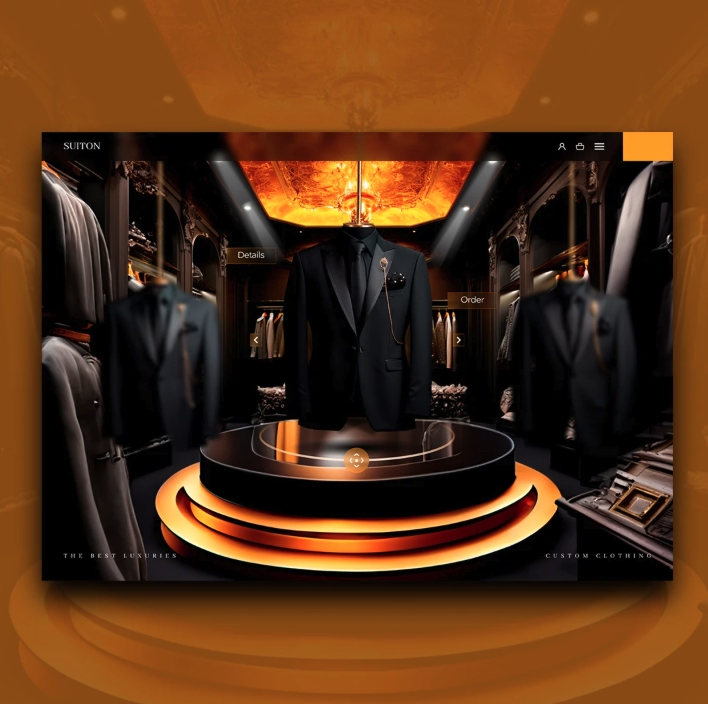
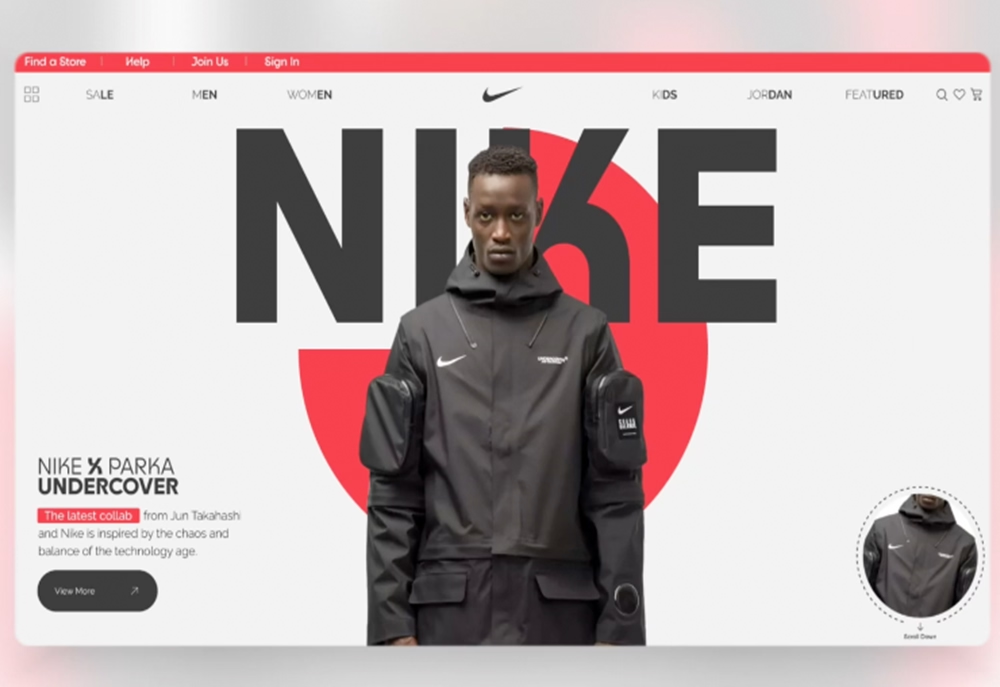
The image above contrasts a streamlined, performance‑oriented interface (top) with an over‑engineered 3D design of coats that you can switch in between. While the latter may dazzle visitors, it can bog down load times and distract from your message. Use 3D elements only when they genuinely enhance your product presentation.
Here’s why 3D designs can hurt your site:
- Longer load times – 3D models and motion graphics require large files and WebGL scripts, increasing page weight and delay. Slow speeds lead to higher bounce rates and lower conversions.
- Accessibility issues – Complex animations can trigger motion sickness or cognitive overload. They may not render well on older browsers or low‑power devices.
- Distracting from the message – Your goal is to communicate value and convert visitors. Eye‑candy effects can distract from your unique value proposition and calls to action. As Studio1 Design notes, if fancy animations or giant 3D graphics make your site feel chaotic or clunky, visitors could get lost before seeing your offers.
3D can be appropriate for product demonstrations (e.g., rotating a shoe or vehicle). But use it sparingly and ensure it’s optimised — compress textures, lazy‑load assets and provide a fallback for browsers that can’t handle the tech. Prioritise clarity over novelty.
Essential Elements of Modern Web Design
Building a high‑performing website isn’t about chasing trends; it’s about mastering fundamentals. Here are the key ingredients:
Responsive and Mobile‑First Design
Over half of web traffic comes from mobile devices. Users expect frictionless experiences regardless of screen size. Responsive design ensures your site adapts to different devices, delivering fast load times and easy navigation. When designing, start with the mobile view to prioritise core content and keep interactions simple. Google’s mobile‑first indexing means your mobile performance heavily influences your overall search ranking.
Clear Information Architecture
Your site structure should guide visitors logically from entry to conversion. Use a concise navigation menu and meaningful page titles. Each page should have one primary objective (sign up, make a purchase, book a call). Avoid cluttered menus and burying content in nested submenus. As design experts warn, complicated navigation frustrates users and increases bounce rates.
Compelling Content and Messaging
Your value proposition must be obvious within seconds. Use clear headlines, concise copy and persuasive calls to action. Avoid jargon. The ELR Agency tone — direct, performance‑oriented and prestige‑driven — resonates: tell your audience exactly how you solve their problems and why you’re the best at it.
Visual Hierarchy and Branding
Use size, colour and spacing to guide attention. Bold branding can signal professionalism but shouldn’t crowd out your content. Studio1 Design advises keeping logos balanced so they support rather than overwhelm your unique selling proposition. Stick to a consistent colour palette and typography that align with your brand identity.
Accessibility and Inclusivity
Design for everyone, including people with disabilities. Follow WCAG guidelines: use sufficient colour contrast, add alt text for images, ensure keyboard navigation and avoid flashing animations. Accessible sites not only serve more users but also rank better in search engines.
Security and Trust Signals
Use HTTPS, display trust badges, show real testimonials and include clear privacy policies. Customers are more likely to convert on sites that feel secure and credible.
Choosing Between DIY Builders and Professional Agencies
As an entrepreneur, you have two main options: build your site using a website maker like Squarespace, Wix or WordPress, or hire a professional web design agency. Each path has advantages and trade‑offs.
DIY Website Builders
Modern website builders offer drag‑and‑drop editors and pre‑made templates, making it possible to launch a site quickly and affordably. Popular platforms include Squarespace, Wix and Shopify. They are ideal for small budgets and simple websites.
Pros:
- Low cost and speed to launch – You can create a basic site without coding or design skills.
- Control and flexibility – Make updates yourself without waiting on a developer.
- Built‑in hosting and maintenance – The platform handles security patches, backups and updates.
Cons:
- Limited customisation – Templates can feel generic and may not fully reflect your brand. Advanced features like custom animations, complex integrations or unique e‑commerce flows may be impossible.
- Performance limitations – Some builders produce bloated code and slower load times. You’re tied to the platform’s infrastructure.
- Scaling challenges – If your business grows, you might outgrow the builder’s capabilities and need to migrate.
Hiring a Web Design Agency
A professional agency designs and builds a tailored site to meet your goals. They bring expertise in UX, UI, coding, SEO and performance optimisation.
Pros:
- Custom design and functionality – Your site reflects your brand and accommodates complex requirements like multilingual content, membership systems or custom product configurators.
- Better performance and SEO – Agencies optimise code, images and servers to meet Core Web Vitals. They test across devices and browsers.
- Strategic guidance – Experts conduct market research, competitor analysis and user testing to align the site with business objectives.
Cons:
- Higher upfront cost – Custom work requires more investment than DIY builders.
- Longer timeline – A bespoke site takes weeks or months to plan, design and build.
- Dependence on your partner – You’ll need to communicate and trust the agency; switching later may be complex.
Hybrid Approach
Some entrepreneurs start with a builder to test ideas then engage an agency for a redesign when their business scales. Others hire freelancers for design and development while retaining control of content updates. The key is to align your choice with your budget, timeline and growth plans.
Actionable Tips for Building a High‑Performing Website
Follow these practical guidelines to ensure your website delivers results:
- Clarify your goals – Define the primary action you want visitors to take. All design decisions should support that goal.
- Plan your content – Create a content hierarchy. Write headlines and copy that communicate benefits quickly. Incorporate keywords like “website design,” “website development,” “web design agency,” “UI UX design” and related terms naturally — not by stuffing them, but by weaving them into meaningful sentences.
- Sketch wireframes – Map out page layouts on paper or in tools like Figma. Focus on the flow of information and actions rather than colours or fonts.
- Optimise images – Compress and resize images. Use next‑gen formats like WebP and lazy‑loading techniques. Large images and videos drag down performance.
- Implement responsive design – Use flexible grids and breakpoints to adapt to different devices. Test on mobile and tablet as well as desktop.
- Minimise plugins and scripts – Each additional plugin or script adds weight. Only include what’s essential. Defer or asynchronously load non‑critical resources.
- Use caching and CDNs – Caching stores static assets locally, reducing server requests. A content‑delivery network (CDN) serves content from locations close to users, improving load times worldwide.
- Conduct user testing – Invite real people to use your site. Ask them to perform tasks and observe where they struggle. Use feedback to iterate.
- Monitor analytics – Track metrics like page load time, bounce rate, conversion rate and user flows. Tools like Google Analytics and Lighthouse highlight performance issues.
- Keep content fresh – Update regularly with articles, case studies or product launches. Fresh content signals to search engines that your site is active and relevant.
Conclusion: Focus on What Matters
Flashy design trends come and go. What endures is a focus on your users, your message and your performance. Entrepreneurs should resist the temptation to chase every shiny trend and instead invest in the fundamentals: fast load times, clear structure, persuasive content and accessible design. Data clearly shows that even a small delay in load time can hurt conversions and satisfaction, while heavy 3D elements can slow down and confuse users.
At ELR Agency, our approach is direct and results‑oriented. We build websites that look prestigious without sacrificing speed or usability. Whether you choose to DIY or hire professionals, prioritise your users’ experience and the performance of your site. The internet moves fast; your website should too.
We define clear objectives, map the shortest path to results, and design systems that remove friction at every step. Every decision is justified, measured, and aligned with conversion, not opinion.
We adopt innovations only when they create real leverage. New tools, methods, or technologies earn their place by improving performance, speed, or clarity, never by trend.
We translate business goals into executable digital systems that support growth, intake, and positioning. The strategy is built to compound over time, not to impress in a deck.

